
Where Does appRules Fit in the Enterprise Stack?
A visual guide to the layers between your applications and your systems of record. By the appStrategy Team.
The Stack in One Picture
An enterprise automation stack has more layers than the applications people use. Something starts the work: a person, an application, an AI assistant, or a schedule. A model can reason about it where AI is used. Connectors reach the data. Systems of record hold the truth. And between the request and the record, something has to decide what the workflow reads, what it may do, and whether the result is good enough to act on before anything is written.
That middle layer is where appRules sits. It takes the request, reads the data it needs through connectors, runs the integration, automation, data migration, replication or synchronization the request calls for, calls an AI provider you choose when a step needs one, checks the result, and only then writes to your systems.
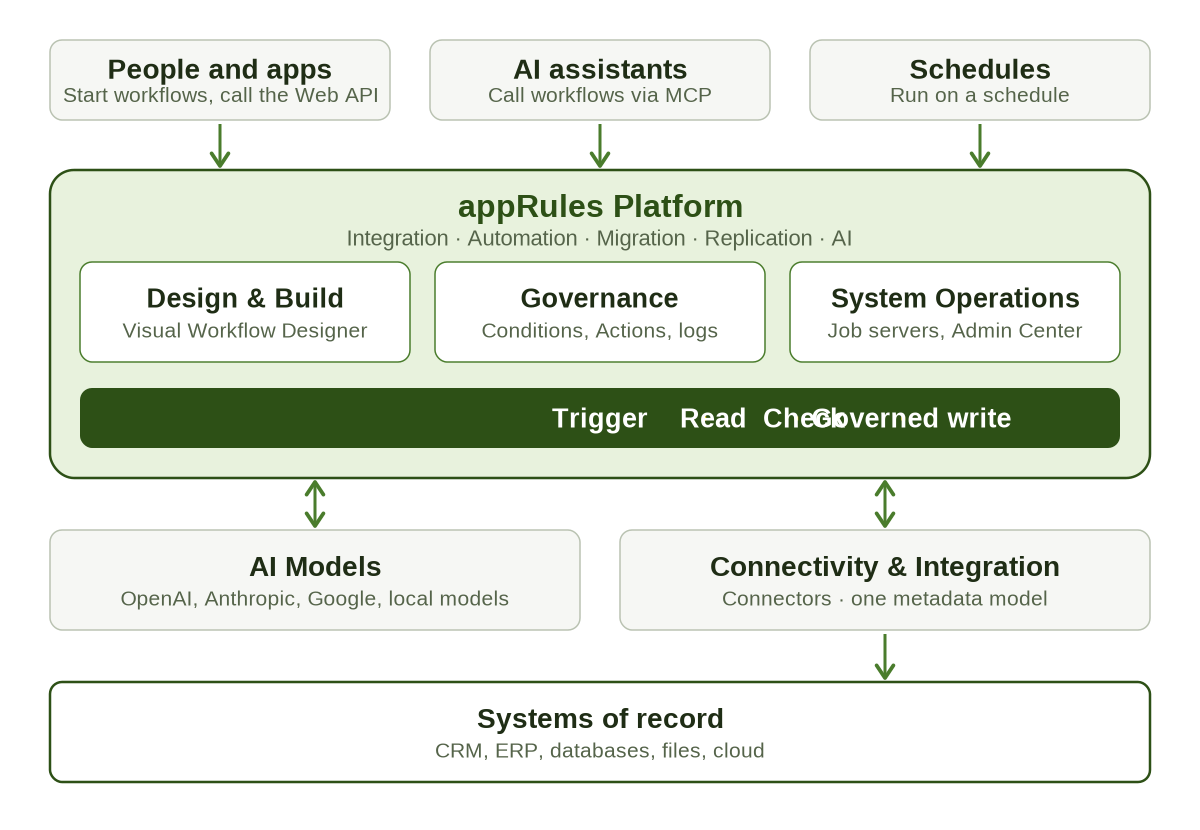
The enterprise stack, with the appRules Platform in the middle. Click to enlarge.
Reading from the top: requests arrive from people and apps (including other systems that call workflows through the appRules Web API), from AI assistants that call workflows through MCP, and from schedules. The platform runs them. The AI models are a choice made at each AI step, not the foundation of the system. Connectors carry data in and out of your systems of record.
Where Connectors, Systems of Record and AI Models Fit
Connectors and systems of record. Your systems of record are not something a workflow works around. Hundreds of connectors read from and write to CRM, ERP, databases, data warehouses, cloud storage and more, all driven by one metadata model. They power integration and automation, data migration, replication and synchronization alike. Each connection is defined once, secured, and referenced by name, so a workflow can be pointed at another environment without being rebuilt. Workflows read through connectors, and named Actions carry out the operations on your systems. See Connectivity & Integration.
AI models. In appRules, the model is something a workflow calls, not something the workflow depends on. Each AI step chooses its own provider and model, from 20+ providers including OpenAI, Anthropic and Google, plus local models, so you can switch or combine models without rebuilding the workflow. The model advises, and named Actions carry out the operations. appRules AI adds configurable controls, GuardRailed Automation and Model Cross-Validation to compose and govern enterprise agentic automation. Go deeper at appRules.ai.
Inside the Platform
The platform has three groups of components, and appRules AI adds to each of them.
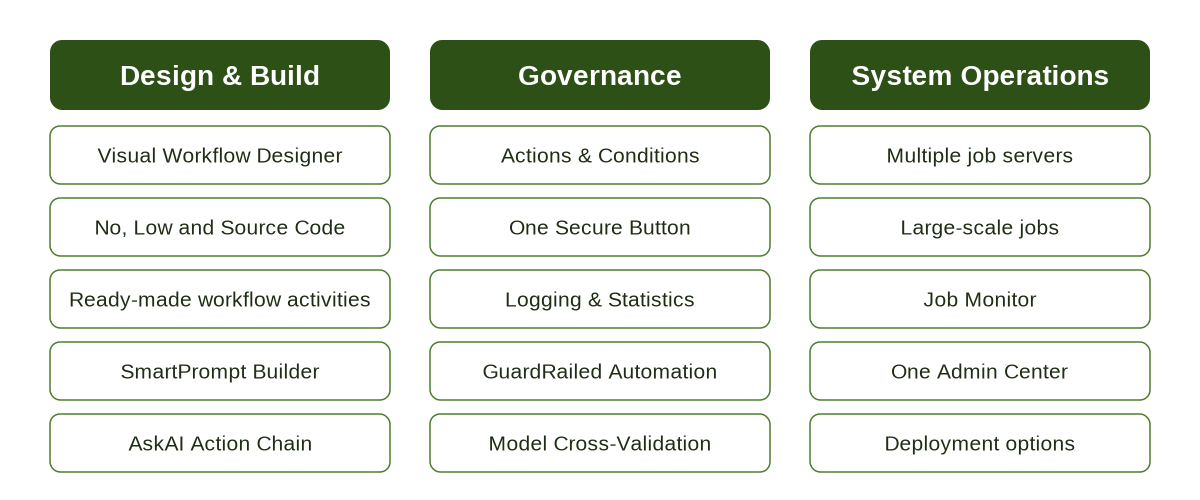
Inside the appRules Platform: three groups of components. Click to enlarge.
- Design & Build is where workflows are created: the Visual Workflow Designer and a rich library of ready-made workflow activities. You start in no code, go further in low code with Expressions and Scripts, and extend in source code with appRules Developer. For AI, the SmartPrompt Builder, Context Picker and AskAI Action Chain build prompts from real context and orchestrate AI step by step.
- Governance keeps automation inside limits: reusable Conditions and Actions, the Secure button, and Logging & Statistics for every run. For AI, GuardRailed Automation and optional Model Cross-Validation govern what AI can do and check its answers.
- System Operations keeps it running: multiple job servers, large-scale and long-running jobs, the Job Monitor, one Admin Center, and your choice of where to deploy.
One Governed Workflow Run
A governed workflow run follows four stages, with Conditions and logging at each one.
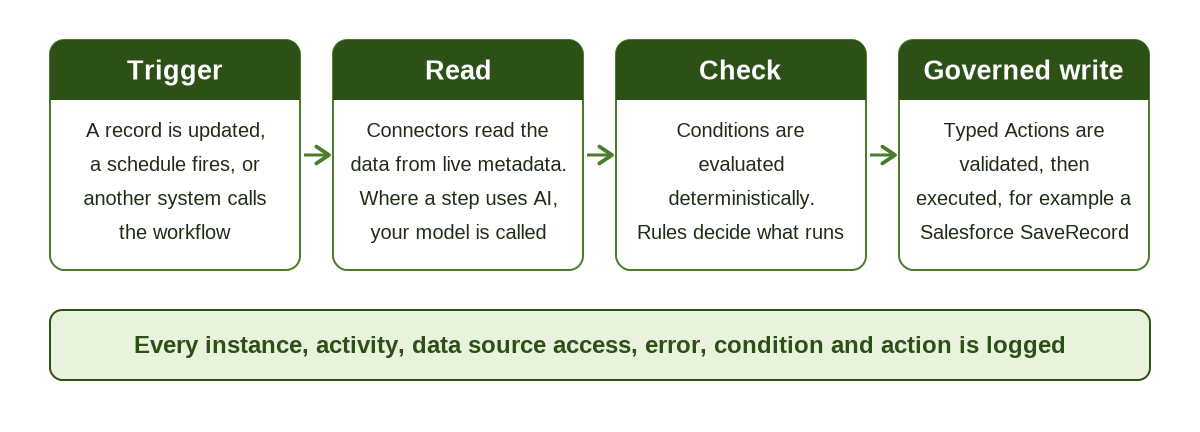
One governed workflow run, from trigger to governed write. Click to enlarge.
Take a simple example. A record is updated in one system and starts a workflow. The workflow reads related data from another system through its connector. Conditions decide whether the change qualifies, and a SaveRecord activity then updates the target record in Salesforce. Where a step uses AI, the same checks apply to the model's answer before anything is written. Every instance, activity, data source access, error, condition, and action is logged, so you can see exactly what happened. See Logging & Statistics.
Or take a scheduled run. The Job Scheduler starts a workflow that uses a data replication activity to copy records from one system into another, such as Dynamics 365 into SQL Server. The same Conditions decide what qualifies, error counts and limits stop a run that goes wrong, and the same log records every read and write. A data migration or synchronization follows the same path.
Where Other Applications Fit
Not every request starts inside appRules. Other applications and systems can call workflows through the appRules Web API, and workflows can run on a schedule through the Job Scheduler. AI assistants can call governed workflows through the appRules MCP Server instead of reaching into your systems themselves. The caller supplies the request, and appRules holds the authority: the same Conditions, the same validated Actions, and the same record of what happened, no matter what started the work.
Questions to Ask About Any Stack
Whatever platform you evaluate, these questions show how the layers fit together:
- Where does each layer sit, and who is accountable for it?
- What happens between the request and the write to a system of record?
- Can I change AI providers or point a workflow at another environment without rebuilding it?
- Is there a complete record of every call, condition, and action?
- How are requests from other applications and AI assistants kept inside the same limits?
- Does it run at production scale, and does it work with the systems I already use?
The Short Version
Applications start the work, connectors reach the data, and systems of record hold it. Something has to govern the path between them. appRules is that layer: it controls what is read, how results are checked, and what gets written, whether the work is integration, automation, data migration, replication, synchronization or AI. Hundreds of connectors and your choice of AI providers sit on one side, and your systems of record on the other.
Explore the platformLet’s deliver something great together
Start a free trial, see a live demo, or talk to us about OEM, white label and partner opportunities.
Prefer email? sales@appstrategy.com