
Every system, every data source — one metadata model
Full read/write connectors across 36 categories, driven by one metadata model, with deep Microsoft integration and central connection management.
On this page
 Enterprise data integration
 Microsoft integration
 One metadata model
 Connection Center
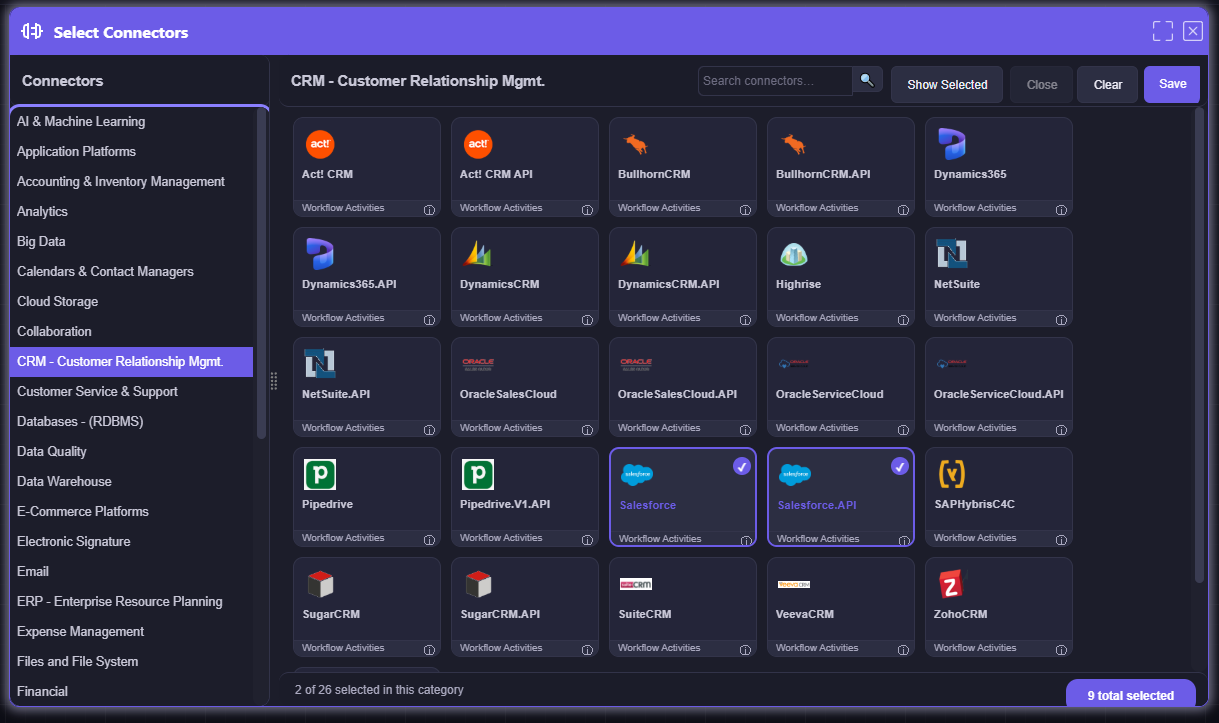
Hundreds of connectors across 36 categories
Native connectivity from CRM and ERP to databases, data warehouses, cloud storage, collaboration and financial systems — connecting directly to the systems your enterprise already runs on.
36 data source categories
From CRM and ERP to Databases, Cloud Storage, Data Quality, Data Warehouse, Collaboration and Financial systems.
Hundreds of CRUD & API connectors
Most connectors ship ready to use, with both Workflow Activity and direct API variants — read, write, update and delete records in minutes, not months.
Full-featured, not API wrappers
Each connector is a no-code subsystem with CRUD, metadata, mapping, Actions and Conditions built in.
Comprehensive Microsoft integration
Built by a team that has engineered on Microsoft technology for more than 20 years — and the same depth extends to every other ecosystem you run.
Business applications
Dynamics 365, Dynamics CRM, Dynamics 365 Business Central, Dynamics NAV and Dynamics GP — with full read/write, metadata-driven connectors.
Microsoft 365 & collaboration
SharePoint, Excel, Excel Online, Teams, Exchange, Office 365, OneDrive, OneNote, Microsoft Project and Access.
Data platform
SQL Server (including SQL Server 2025), Azure SQL, Microsoft Dataverse, Azure Synapse, Azure Cosmos DB, ADLS Gen1 and Gen2, Azure Table Storage and Azure Analysis Services.

Developer experience
appRules Developer is a real Visual Studio solution — Solution Explorer, IntelliSense and Git integration — and Function actions call directly into your own .NET assemblies.
Identity & deployment
Sign in with Microsoft through OpenID Connect, connect to Active Directory and Azure AD, and run appRules on Windows desktop, Windows Server or Azure.

Every other ecosystem, too
Salesforce, SAP, Oracle, Workday, Google, AWS, Snowflake and hundreds more.
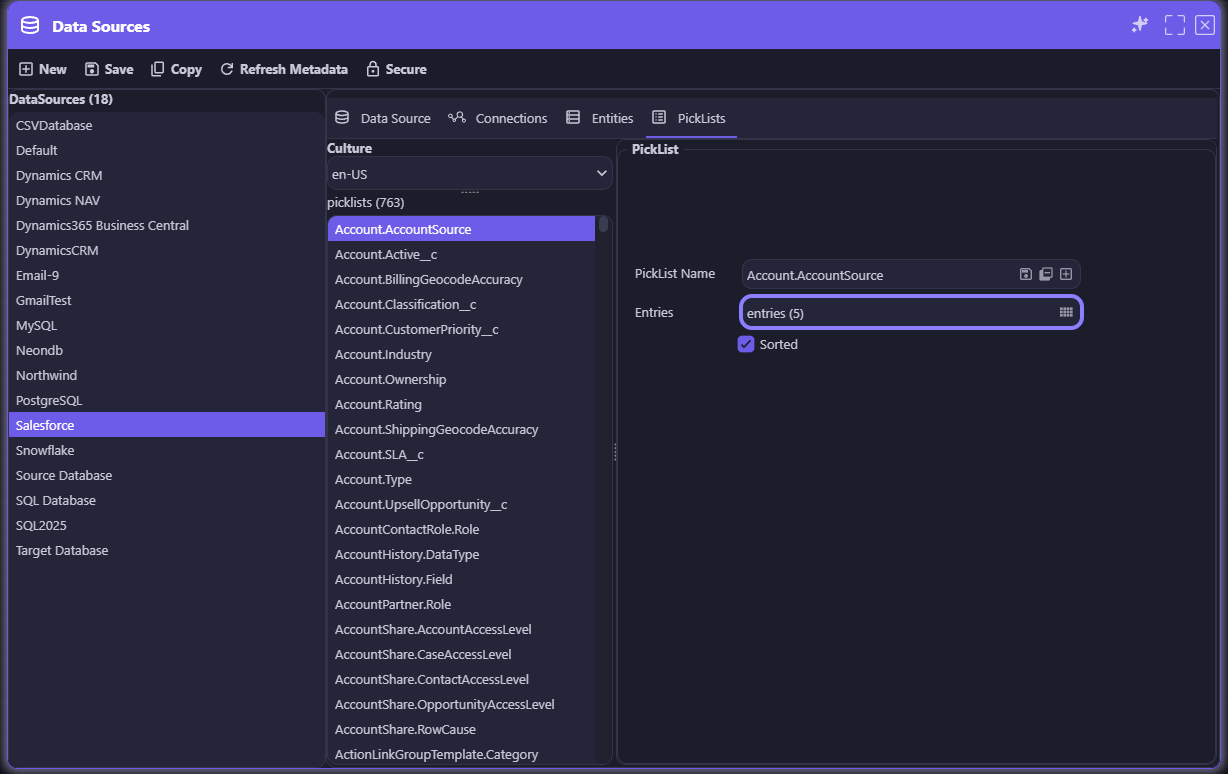
One metadata model, every data source
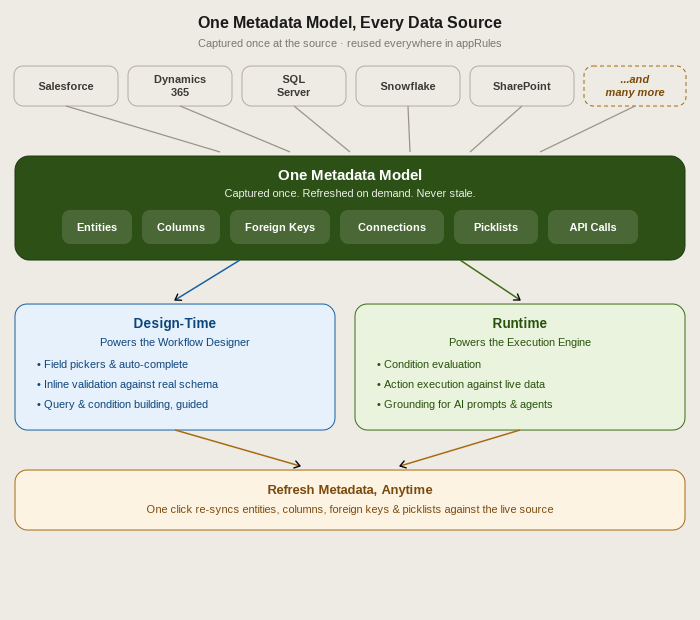
For every data source, appRules captures and manages rich, living metadata — entities, columns, foreign keys, connections, picklists and API calls. That same metadata drives both the design-time experience and the runtime engine.
Most platforms treat metadata as a one-time setup step. appRules treats it as a living asset: every entity, column, key and picklist is inventoried, and Refresh Metadata re-syncs against the live source so the model never drifts out of date. The single model is reused everywhere — field pickers, queries, validation, Conditions and Actions.
A vast library of data source types
Salesforce, Dynamics 365, Dataverse, SQL Server, PostgreSQL, MySQL, Oracle, Snowflake, SharePoint, HubSpot, ServiceNow, Google Drive and hundreds more.
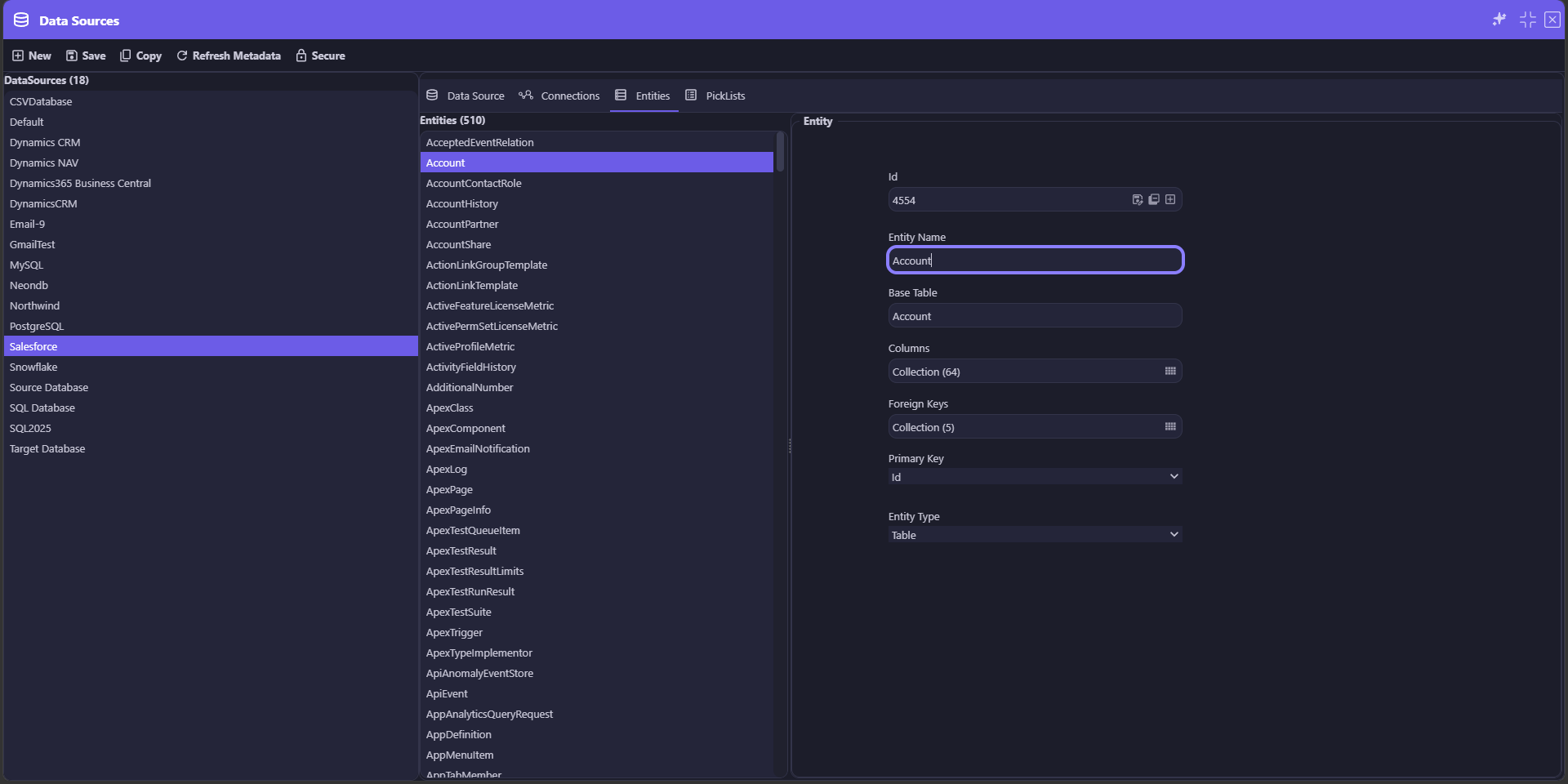
Deep entity metadata
Columns, foreign keys and primary keys are discovered and cataloged automatically — a single source can surface hundreds of entities.
Environment-aware connections
One data source definition, many connections. Default, Development, Production and Test can each point to a different connection.
Live picklists, not guesswork
Every picklist and its valid entries are captured per culture, so Conditions and validations use real values.
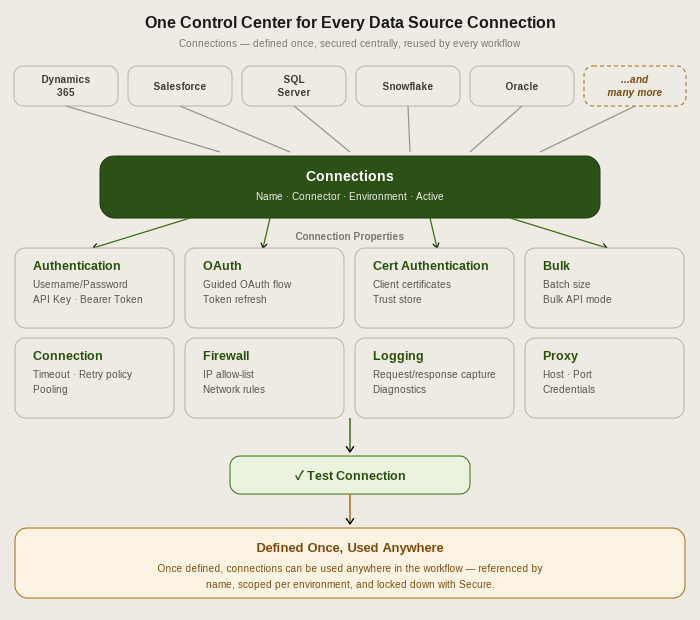
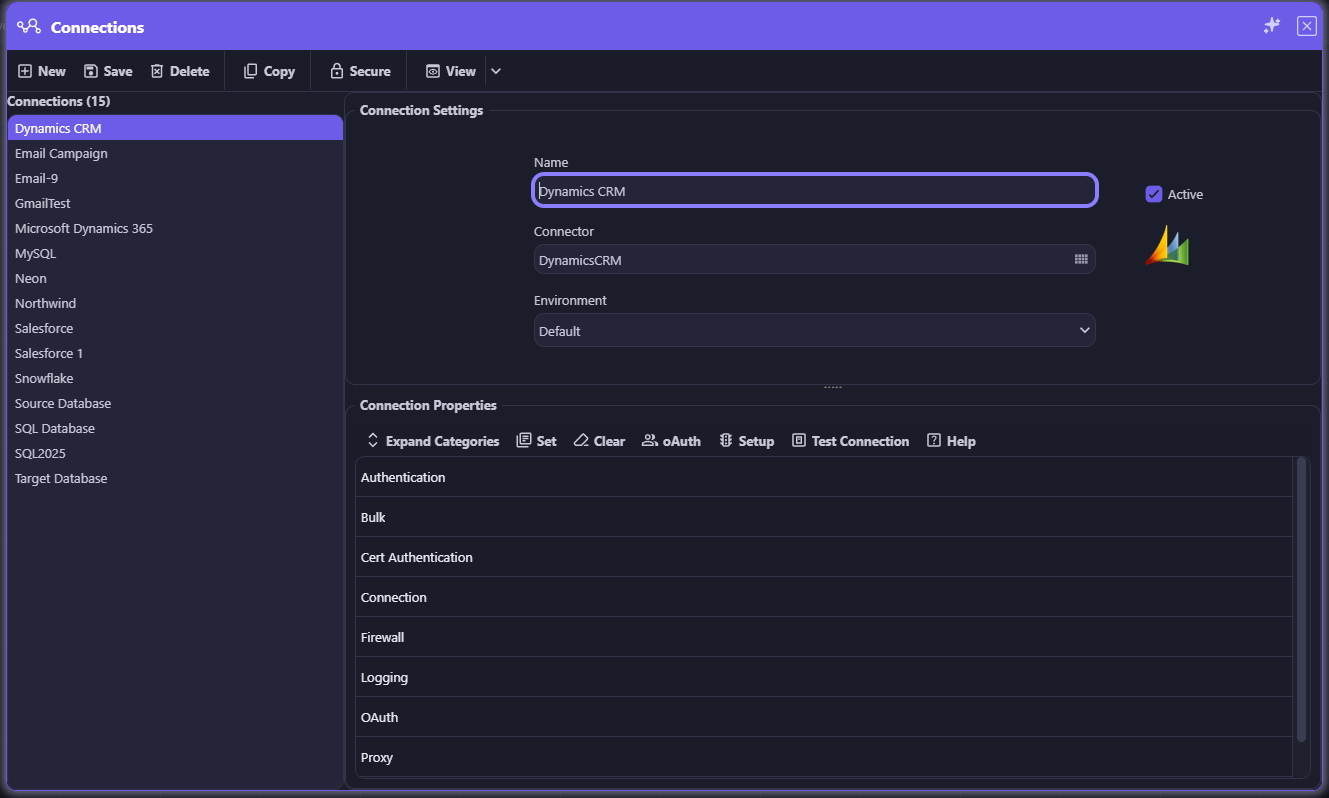
One control center for every data source connection
Authentication, OAuth, certificates, firewall rules, logging and proxy settings — defined once, secured centrally and reused anywhere in a workflow.
One connection, used everywhere
Define a connection once and reference it by name across every workflow. No re-entering credentials.
Categorized properties
Authentication, Bulk, Cert Authentication, Connection, Firewall, Logging, OAuth and Proxy settings, with guided configuration.
Built-in OAuth & setup wizards
Walk through provider-specific authentication flows directly in the console — no external tooling or manual token handling.

Test Connection
Validate credentials and connectivity with one click, catching configuration issues at setup time, not at runtime.
Environment-aware & secured
Scope any connection to Default, Development, Production or Test, and lock it down with Secure.
Swap sources without touching a workflow
Pointing a workflow at a different environment is a configuration change, not a redevelopment effort.
Connectivity for AI
appRules AI adds a control center for AI providers, embeddings, vector storage, reranking, web search and callable tools, alongside your data connections.
- 20+ AI providers
- Embedding and vector stores
- Reranking and web search
- Callable tools and the MCP Server
Let’s deliver something great together
Start a free trial, see a live demo, or talk to us about OEM, white label and partner opportunities.
Prefer email? sales@appstrategy.com